“Which device fits what we are building?”
Start with the host equipment and customer interaction. A USB scanner, a dedicated terminal and a payment POS serve different integration needs.
Building palm vein payment or identity verification? Define the device, application and backend responsibilities before you start integrating.
For product teams, developers and solution providers.
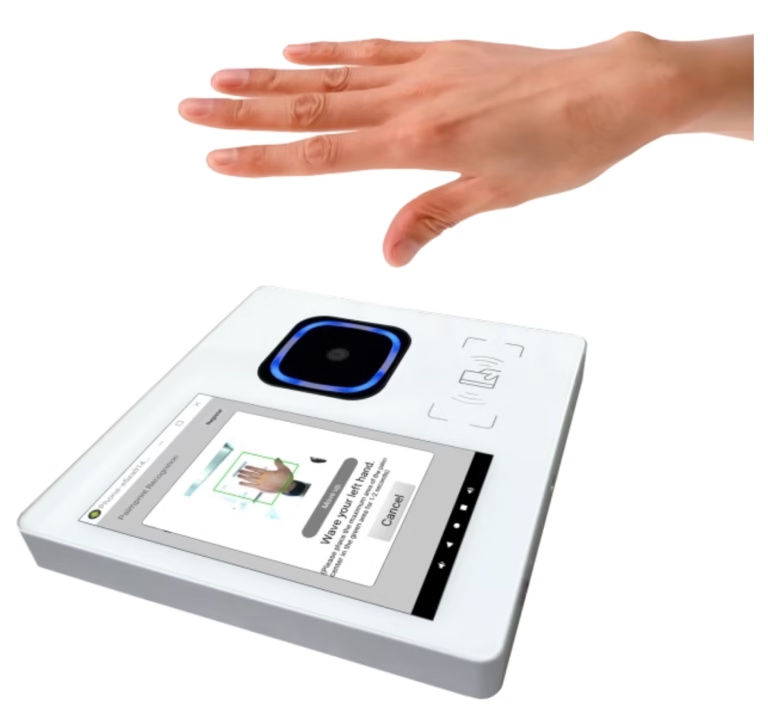
Customers need a complete journey: enrol a user, recognise their palm, identify the right account and complete the intended action. Make each responsibility clear.
Start with the host equipment and customer interaction. A USB scanner, a dedicated terminal and a payment POS serve different integration needs.
Separate palm capture and matching from your account database, middleware, cashier connection and payment decisions.
Use a defined pilot to validate the journey. Plan identifiers and required source images before a later large-model migration.
Select the closest scenario to see a starting route. Final compatibility depends on your hardware, operating environment and workflow.
PalmVein01 / PalmVein01 Pro can be assessed for integration with a compatible host. Confirm USB data access, power supply, OS and SDK requirements before choosing.
WavePass500 can be evaluated for a dedicated registration or identity workflow. Your application and backend still need to be integrated for your business use case.
AirOne combines a POS platform with palm vein capture. Confirm payment application integration, acquiring requirements and the intended checkout experience with your payment team.
Windows, Linux and Android SDK options are available. Confirm the exact SDK, language and model requirements for your project.
For server-side palm vein authentication, keep biometric matching and your business workflow connected through a clearly defined integration.
Use the supplied SDK to capture palm data and extract device-side features.
Manage authentication, account context and communication with the algorithm service.
Provide the biometric matching result, including the matched user identifier when successful.
Apply your account, transaction or access logic and display the outcome.
| Component | Role in the project |
|---|---|
| BioWavePass hardware & SDK | Palm capture, device-side feature extraction and documented integration interfaces. |
| Algorithm service | Biometric matching under the selected architecture and registered-user capacity. |
| Your application & middleware | User interface, account binding, API formats, callbacks, authentication and business workflow. |
| Your payment platform | Payment processing and transaction decisions within your payment or wallet integration. |
10,000
registered IDs
Free small-model algorithm deployment on your own server, with no licence expiry date.
The free offer covers the small-model algorithm deployment. Hardware, infrastructure and application development are separate.
0 of 5 preparation items reviewed
Use this as a discussion checklist. It does not certify production readiness.
Moving from the small model to the large model is more than changing a licence. Your data, SDK integration and account mappings need a migration plan.
Keep registration identifiers in your own backend. For a future large-model migration, retain the required RGB and IR source images under your approved data-handling policy. If those images are unavailable, users may need to re-enrol.
The services are independent. The same terminal application can support both with the necessary integration. Test the new flow before retiring the old one.
Update small-model featureId bindings to the corresponding large-model user_id. Stop old-service requests and securely delete retired biometric data when appropriate.
Focused answers for the team building the application, not just selecting the scanner.
12 questionsOnly if the POS supports the required USB data connection, host permissions and power supply. Many POS USB ports are designed only for charging. Provide the make, model and operating system for compatibility assessment.
SDK options are available for Windows, Linux and Android. Confirm the specific SDK package and development language before implementation. Host-system USB permissions and restrictions must also be checked.
Your team can design middleware APIs, request and response formats, authentication, callbacks and payment logic. Changes to core SDK or algorithm-service interfaces need a separate custom-development assessment.
The SDK does not retain registration feature IDs for your business platform. Your backend must store the returned identifiers and bind them to the appropriate user or account.
A free algorithm deployment on your own server supports up to 10,000 registered user IDs with no expiry date. Hardware, server infrastructure and application/backend development are separate.
Yes. Deleting a registered user frees capacity for another registration. The capacity is not a cumulative count of payment transactions or all registrations ever performed.
The large-model workflow requires the relevant RGB and IR source images in addition to its feature workflow. Plan image retention before migrating from the small model. If required images are unavailable, re-enrolment may be necessary.
Yes, the services are independent. The terminal application can support both with the necessary SDK and backend integration. Validate identifier mappings and the target workflow before switching business requests.
Server-side matching requires a network path to your backend and algorithm service. Offline server installation does not provide device-local matching. Discuss local matching separately if that is your requirement.
No. The algorithm supplies the biometric matching result. Your backend and payment application decide how to use it for account verification and transaction authorisation. Payment processing stays within your payment integration.
Additional support can be assessed after you provide detailed tasks, the existing architecture and expected deliverables. Scope, implementation time and commercial terms depend on those requirements.
There is no universal integration timeline. Hardware compatibility, developer familiarity, backend readiness and business requirements all affect delivery. Algorithm deployment estimates should not be treated as a complete application-development schedule.
Share your intended workflow and technical environment so the right products, integration support and deployment approach can be assessed.
Additional application development or platform review requires specific requirements and expected deliverables before a timeline or cost can be estimated.
This planner runs in your browser. Nothing is submitted until you choose to send an email.